
AWS Compute — Choosing the Right Engine for the Job
After deploying hundreds of production workloads on AWS — from scrappy startups running on a single EC2 instance to Fortune 500 companies orchestrating thousands of containers — I can tell you one thing with certainty: choosing the right compute service is the single most impactful architectural decision you'll make.
Get it wrong, and you'll spend the next two years fighting your infrastructure instead of building your product. Get it right, and your platform will scale gracefully while your CFO sends you thank-you emails about the AWS bill.
Let's cut through the marketing and talk about what actually works.
The AWS Compute Landscape in 2026
AWS offers seven primary compute services, and each exists for a reason. The trick isn't knowing what they do — it's knowing when to reach for each one.
| Service | One-liner | Best For |
|---|---|---|
| EC2 | Virtual machines you control | Full control, stateful workloads, legacy apps |
| ECS | AWS-native container orchestration | Teams already deep in AWS, simpler container needs |
| EKS | Managed Kubernetes | Multi-cloud strategy, K8s ecosystem, complex orchestration |
| Lambda | Event-driven functions | Glue code, event processing, intermittent workloads |
| Fargate | Serverless containers | Container workloads without managing nodes |
| Lightsail | Simplified VPS | Simple web apps, WordPress, dev/test |
| App Runner | Source-to-URL containers | Developers who want zero infrastructure thinking |
EC2: The Swiss Army Knife (That You Should Still Reach For)
I know it's fashionable to say "just go serverless," but EC2 remains the backbone of AWS. Over 80% of the workloads I've architected still touch EC2 in some form. Here's why it endures:
When EC2 is the Right Call
- Stateful applications — Databases, message brokers, legacy monoliths that need persistent local storage and consistent network identity.
- GPU/ML workloads — Training models on P5 instances with NVIDIA H100 GPUs. Lambda doesn't do this.
- High-throughput networking — When you need 200 Gbps with Elastic Fabric Adapter (EFA) for HPC workloads.
- License-bound software — BYOL scenarios where you need dedicated hosts or specific NUMA topologies.
- Long-running processes — Anything that runs for hours or days continuously.
Instance Families: A Cheat Sheet
After years of navigating the alphabet soup of instance types, here's how I think about them:
General Purpose (M, T, Mac):
  M7g, M7i  → Your default. Start here.
  T3, T4g   → Burstable. Dev/test, small web apps.
  Mac       → macOS builds for iOS/macOS CI/CD.

Compute Optimized (C):
  C7g, C7i  → Batch processing, gaming servers, HPC, media encoding.
  C7gn      → Network-intensive. 200 Gbps networking.

Memory Optimized (R, X, z):
  R7g, R7i  → In-memory databases, real-time analytics.
  X2idn     → SAP HANA, massive in-memory datasets (up to 4 TB).
  z1d       → High single-thread performance + memory.

Accelerated (P, G, Trn, Inf, DL):
  P5        → ML training (H100 GPUs).
  G5        → Graphics rendering, ML inference.
  Trn1      → AWS Trainium for cost-effective ML training.
  Inf2      → AWS Inferentia for ML inference.

Storage Optimized (I, D, H):
  I4i       → High random I/O (databases, Elasticsearch).
  D3        → Dense HDD storage (data lakes, HDFS).
  H1        → High throughput sequential workloads.

HPC Optimized (Hpc):
  Hpc7g     → Tight-coupled HPC, CFD, weather modeling.
💡 Pro Tip: Always start with the latest generation. If you're still running M5 instances, you're leaving 15-25% performance (and savings) on the table by not migrating to M7g (Graviton3) or M7i. The migration is almost always painless for Linux workloads.
The Graviton Advantage
I'm going to be blunt: if you're running Linux workloads on x86 and haven't evaluated Graviton, you're overpaying.
AWS Graviton processors (currently Graviton3 and Graviton4) deliver:
- Up to 25% better compute performance vs. equivalent x86 instances
- Up to 20% lower cost per instance
- Up to 60% less energy consumption for the same performance
That's not marketing — those are numbers I've validated across dozens of production migrations. The combined effect is roughly 35-40% better price-performance for typical web/API workloads.
# Testing Graviton compatibility is straightforward:
# 1. Build your container for ARM64
docker buildx build --platform linux/arm64 -t myapp:arm64 .

# 2. Run on a Graviton-based instance (any instance ending in 'g')
# m7g.large, c7g.xlarge, r7g.2xlarge, etc.
The exceptions where x86 still makes sense:
- Windows workloads (Graviton doesn't run Windows)
- Software with x86-only dependencies (rare but exists)
- Specific ISV licensing tied to x86
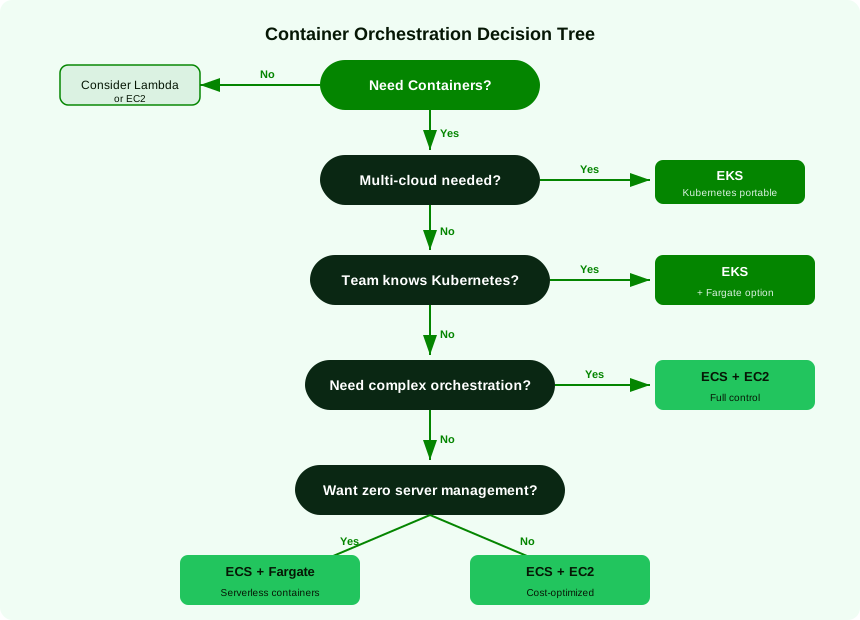
ECS vs. EKS: The Container Wars
This is the question I get asked most often. Here's my honest take:
Choose ECS When:
- Your team is AWS-native and doesn't need K8s portability
- You want simpler operations (no control plane management)
- You're running straightforward microservices (< 50 services)
- You value tight AWS integration (Service Connect, CloudMap)
Choose EKS When:
- Multi-cloud or hybrid-cloud is a real requirement (not theoretical)
- Your team already knows Kubernetes deeply
- You need the K8s ecosystem (Helm, Istio, ArgoCD, custom operators)
- You're running complex orchestration patterns (stateful sets, CRDs)
- You need advanced scheduling (affinity, taints, topology spread)
💡 Pro Tip: Don't choose EKS because "everyone uses Kubernetes." I've seen teams spend 6 months setting up EKS when ECS would have taken 2 weeks. Kubernetes is powerful, but it's a tax. Make sure you're getting value from that tax.
Fargate: The Node-Less Middle Ground
Fargate removes node management for both ECS and EKS. Use it when:
- You don't want to manage, patch, or scale EC2 instances
- Your workloads have variable, unpredictable scaling needs
- You want per-task billing instead of per-instance billing
But beware: Fargate costs roughly 30-40% more than equivalent self-managed EC2 capacity at steady state. The savings come from:
- Not over-provisioning nodes
- Zero node management operational overhead
- Faster scaling (no waiting for EC2 instances to launch)
For steady, predictable workloads, EC2 launch type with Spot instances will almost always be cheaper.
Lambda: Know Its Sweet Spots
Lambda is incredible for the right workloads. It's terrible for the wrong ones.
Lambda excels at:
- API backends with spiky, unpredictable traffic
- Event processing (S3 uploads, DynamoDB streams, SQS messages)
- Scheduled tasks (cron-like jobs)
- Glue code between AWS services
- Workloads with low-to-moderate concurrency
Lambda struggles with:
- Sustained high-throughput (> 1000 concurrent executions consistently)
- Workloads requiring > 15 minutes of execution time
- Applications needing persistent connections (WebSockets, long-polling)
- Heavy initialization costs (large frameworks, JVM cold starts)
I cover Lambda much more deeply in my serverless article.
Lightsail and App Runner: The Underrated Options
Lightsail
I recommend Lightsail more often than you'd expect. It's perfect for:
- Small business websites — WordPress, static sites, simple CMSes
- Dev/test environments — Predictable monthly pricing, no surprises
- Proof of concepts — When you need a VM in 30 seconds without VPC headaches
Lightsail instances start at $3.50/month with predictable pricing. You get a VM, storage, a static IP, and data transfer included. For a small WordPress site, this beats a t3.micro + EBS + Elastic IP + data transfer charges every time.
App Runner
App Runner is AWS's answer to Heroku/Railway/Render. Point it at a container image or source code repo, and it gives you a running HTTPS endpoint. No VPC, no load balancer, no scaling config.
Use App Runner when:
- Developers want to deploy without thinking about infrastructure
- You need a simple web service with auto-scaling
- You want source-to-URL in minutes
- Internal tools, prototypes, simple APIs
Skip App Runner when:
- You need VPC integration with private resources (it supports it now, but it's clunky)
- You need fine-grained scaling control
- You're running complex multi-service architectures
- Cost optimization is critical (App Runner's per-request pricing adds up)
The Pricing Playbook: Stop Overpaying
Pricing Model Decision Matrix
| Model | Savings | Commitment | Flexibility | Best For |
|---|---|---|---|---|
| On-Demand | 0% (baseline) | None | Total | Spiky workloads, dev/test, short-term |
| Spot | Up to 90% | None (but can be interrupted) | High (if fault-tolerant) | Batch, CI/CD, stateless workers |
| Compute Savings Plans | Up to 66% | 1 or 3 year $/hr | High (any instance, region, OS) | Baseline compute across services |
| EC2 Instance Savings Plans | Up to 72% | 1 or 3 year, specific family+region | Medium | Predictable, stable workloads |
| Reserved Instances | Up to 72% | 1 or 3 year, specific instance type | Low | Being phased out — prefer Savings Plans |
My Pricing Strategy
After optimizing millions of dollars in AWS spend, here's the layered approach I recommend:
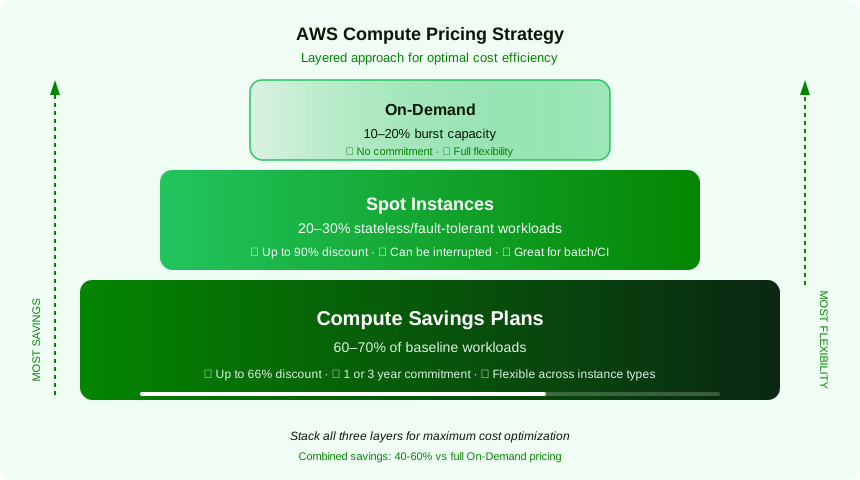
- Start with Compute Savings Plans — They apply across EC2, Fargate, and Lambda. Start with 1-year, no upfront. Cover your consistent baseline.
- Layer in Spot for fault-tolerant workloads — CI/CD pipelines, batch processing, stateless API tiers behind load balancers. Use Spot Fleet or EC2 Auto Scaling with mixed instances.
- Keep On-Demand for the rest — Spiky traffic, new workloads where you haven't established a baseline yet.
💡 Pro Tip: Use AWS Cost Explorer's "Savings Plans Recommendations" — it analyzes your last 7, 30, or 60 days of usage and tells you exactly how much to commit. I've seen it nail the recommendation within 5% of optimal. Don't guess. Use the data.
Spot Instance Strategy
Spot instances deserve special attention because the savings are massive — but you need a strategy:
# Example: EC2 Auto Scaling Group with mixed instances for resilience
# diversify across instance types and AZs to reduce interruption risk

aws autoscaling create-auto-scaling-group \
  --auto-scaling-group-name my-spot-asg \
  --mixed-instances-policy '{
    "LaunchTemplate": {
      "LaunchTemplateSpecification": {
        "LaunchTemplateName": "my-template",
        "Version": "$Latest"
      },
      "Overrides": [
        {"InstanceType": "m7g.large"},
        {"InstanceType": "m6g.large"},
        {"InstanceType": "m7i.large"},
        {"InstanceType": "c7g.large"},
        {"InstanceType": "r7g.large"}
      ]
    },
    "InstancesDistribution": {
      "OnDemandBaseCapacity": 2,
      "OnDemandPercentageAboveBaseCapacity": 20,
      "SpotAllocationStrategy": "price-capacity-optimized"
    }
  }' \
  --min-size 4 --max-size 20 --desired-capacity 6
Key Spot rules:
- Diversify across 5+ instance types and 3+ AZs — The
price-capacity-optimizedallocation strategy handles the rest. - Always keep an On-Demand baseline — Never go 100% Spot in production.
- Handle interruptions gracefully — Use the 2-minute interruption notice, drain connections, checkpoint work.
- Use Spot for ECS/EKS worker nodes — Pair with Fargate as a fallback for critical tasks.
Real-World Architecture Decision Scenarios
Scenario 1: SaaS Platform (B2B, 10K Users)
Workload: Multi-tenant web application with API, background jobs, and a database.
My recommendation:
- API tier: ECS on Fargate (auto-scales, no node management, pay per task)
- Background workers: ECS on EC2 with Spot instances (cost-efficient, fault-tolerant)
- Database: RDS Aurora PostgreSQL on Graviton (r7g instances)
- Async processing: Lambda for event-driven tasks (S3 processing, notifications)
- Pricing: Compute Savings Plan covering 70% of Fargate + RDS baseline
Scenario 2: Machine Learning Pipeline
Workload: Daily model training, real-time inference API, data preprocessing.
My recommendation:
- Training: EC2 P5 or Trn1 instances with Spot (save 60-70%, checkpoint every epoch)
- Inference: EKS with Inf2 instances (Inferentia2 for cost-effective inference)
- Preprocessing: Lambda or AWS Glue (event-triggered, scales to zero)
- Orchestration: Step Functions to coordinate the pipeline
Scenario 3: Startup MVP (Zero to Launch)
Workload: Web app, need to ship fast, team of 3 developers.
My recommendation:
- Start with App Runner — Point at your container repo, get a URL, ship features
- Database: Aurora Serverless v2 (scales to zero during off-hours)
- Background jobs: Lambda (SQS-triggered)
- Migrate to ECS/Fargate when you outgrow App Runner's flexibility (usually around Series A)
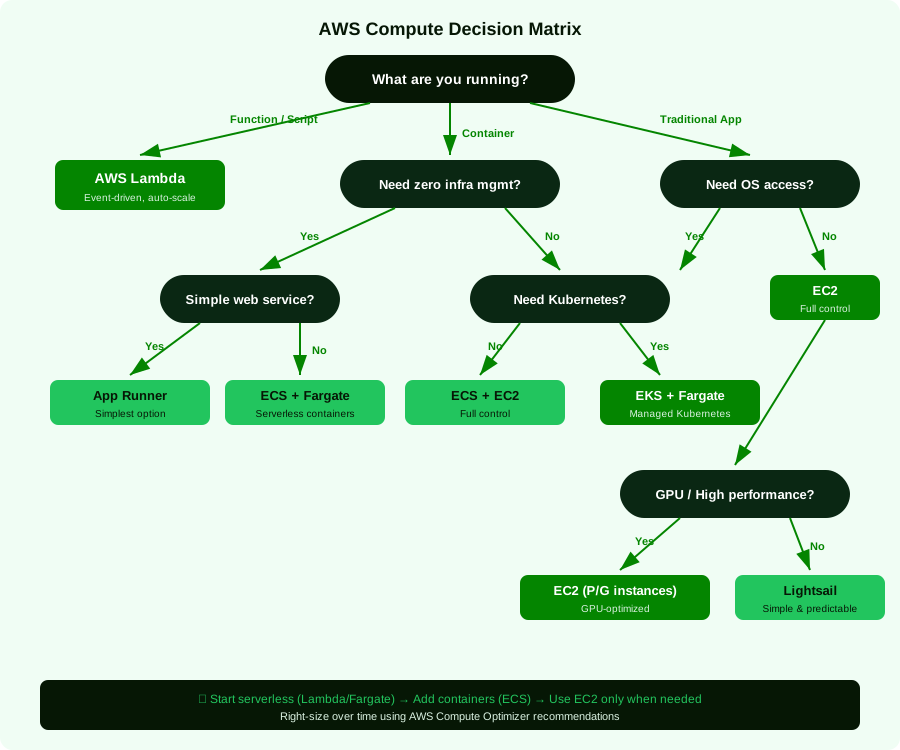
The Compute Decision Matrix
When choosing your compute service, ask these questions in order:
Key Takeaways
- There is no universal "best" compute service. The right choice depends on your workload characteristics, team expertise, and operational maturity.
- Default to Graviton for Linux workloads. The price-performance advantage is too significant to ignore.
- Don't over-engineer your container platform. ECS is perfectly fine for 90% of container workloads. Choose EKS only when you genuinely need the Kubernetes ecosystem.
- Layer your pricing strategy: Savings Plans for baseline, Spot for fault-tolerant workloads, On-Demand for everything else.
- Start simple, evolve as needed. App Runner → ECS/Fargate → EKS is a natural progression. Don't start at EKS because you think you'll need it someday.
- Spot instances are free money for the right workloads — but diversify your instance types and always have a fallback.
What's Next
In the next article, I go deep on Serverless on AWS — Beyond the Hype, where I'll share honest opinions on cold starts, event-driven architecture patterns, cost optimization at scale, and when serverless is genuinely not the right answer. If you've been thinking about going serverless (or are already there and struggling), that one's for you.