
AWS Governance at Scale — Guardrails Without the Red Tape
Governance is the word that makes engineers groan and makes compliance officers smile. I've been on both sides. I've managed environments with over 100 AWS accounts, and I can tell you: the organizations that get governance right move faster, not slower.
The ones that get it wrong end up in one of two places:
- Anarchy — Every team has their own account with no guardrails. Security incidents, runaway costs, and shadow IT everywhere.
- Bureaucracy — A centralized cloud team that gates every change. Deployment tickets that take two weeks. Engineers who hate the cloud team.
The sweet spot is automated guardrails: policies that prevent the truly dangerous stuff while giving teams maximum autonomy for everything else.
Here's how I build that.
The Multi-Account Strategy: Foundation of Everything
If you're running more than one production workload on AWS, you need multiple accounts. This is not optional. It's the single most important governance decision you'll make.
Why Multiple Accounts?
- Blast radius containment — A compromised account can't reach other accounts
- Billing isolation — Clear cost attribution per team/project/environment
- Service limit isolation — One team's Lambda concurrency spike doesn't affect another
- IAM boundary — Account boundaries are the strongest IAM boundary in AWS
- Compliance scope — Reduce the scope of audits (PCI, HIPAA, SOC2) to specific accounts
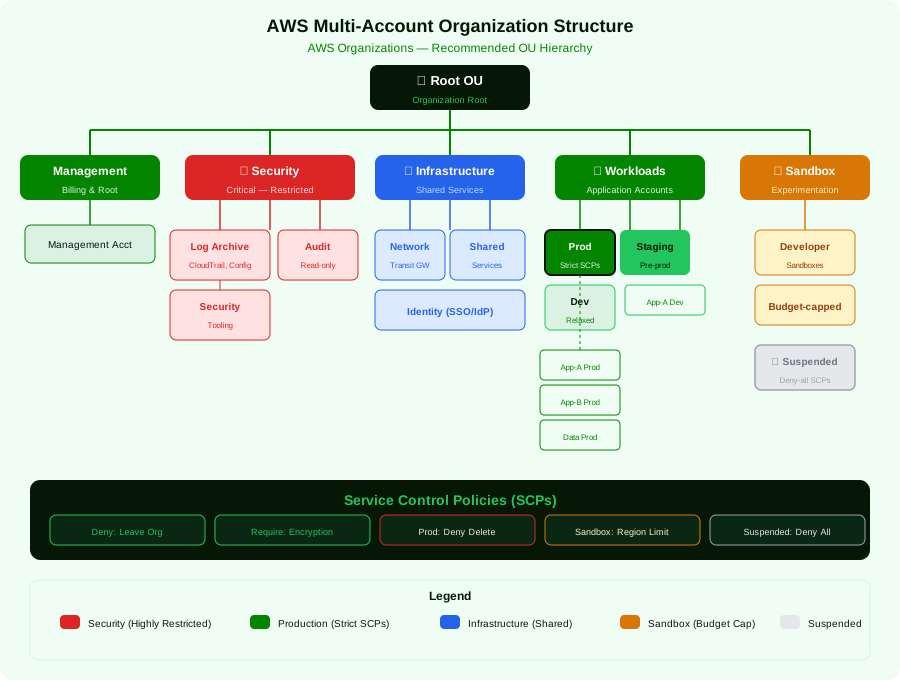
My Recommended OU Structure
After building landing zones for organizations from 10 to 500+ accounts, this structure works for most:
Key Design Decisions
One account per workload per environment. Team A gets team-a-dev, team-a-staging, team-a-prod. This gives you clean blast radius isolation and cost attribution.
Dedicated security accounts. Never put security tooling in the management account. The management account should be locked down with near-zero human access — it's used for Organizations management and billing only.
Sandbox accounts with guardrails. Give developers sandbox accounts with a monthly budget cap ($50-$200) and SCPs that prevent creating expensive resources (no p5.48xlarge instances!). This enables experimentation without risk.
The Suspended OU. When accounts are decommissioned, move them here with an SCP that denies all actions ("Effect": "Deny", "Action": "*", "Resource": "*"). Don't delete accounts — you may need them for audit trails.
💡 Pro Tip: The Policy Staging OU is your safety net for testing SCPs. Before applying a new SCP to your Production OU, apply it to Policy Staging first and test with a sacrificial account. I've seen a miswritten SCP lock an entire organization out of their production accounts. Test first. Always.
Service Control Policies: The Art of Saying No
SCPs are the most powerful governance tool in AWS. They define the maximum permissions boundary for every principal in an account. Even root can't override an SCP.
SCP Strategy: Deny-List vs. Allow-List
I strongly prefer the deny-list approach for most organizations:
- Allow-list: Start by denying everything, then explicitly allow what's needed. Extremely secure, but operationally painful. Every new service adoption requires an SCP update.
- Deny-list: Allow everything by default, then deny specific dangerous actions. More practical, easier to maintain, and doesn't block teams from using new AWS services.
For highly regulated environments (government, healthcare), an allow-list may be required. For everyone else, deny-list gives you 95% of the security with 20% of the operational overhead.
My Essential SCP Library
Here are the SCPs I deploy in every organization:
1. Prevent Leaving the Organization
{
  "Version": "2012-10-17",
  "Statement": [
    {
      "Sid": "PreventLeavingOrganization",
      "Effect": "Deny",
      "Action": ["organizations:LeaveOrganization"],
      "Resource": "*"
    }
  ]
}
2. Enforce Region Restrictions
{
  "Version": "2012-10-17",
  "Statement": [
    {
      "Sid": "DenyNonApprovedRegions",
      "Effect": "Deny",
      "NotAction": [
        "a4b:*",
        "acm:*",
        "aws-marketplace-management:*",
        "aws-marketplace:*",
        "budgets:*",
        "ce:*",
        "chime:*",
        "cloudfront:*",
        "config:*",
        "cur:*",
        "directconnect:*",
        "ec2:DescribeRegions",
        "ec2:DescribeTransitGateways",
        "ec2:DescribeVpnGateways",
        "fms:*",
        "globalaccelerator:*",
        "health:*",
        "iam:*",
        "importexport:*",
        "kms:*",
        "mobileanalytics:*",
        "networkmanager:*",
        "organizations:*",
        "pricing:*",
        "route53:*",
        "route53domains:*",
        "route53-recovery-cluster:*",
        "route53-recovery-control-config:*",
        "route53-recovery-readiness:*",
        "s3:GetBucketLocation",
        "s3:ListAllMyBuckets",
        "shield:*",
        "sts:*",
        "support:*",
        "trustedadvisor:*",
        "waf-regional:*",
        "waf:*",
        "wafv2:*",
        "wellarchitected:*"
      ],
      "Resource": "*",
      "Condition": {
        "StringNotEquals": {
          "aws:RequestedRegion": ["us-east-1", "eu-west-1", "eu-central-1"]
        }
      }
    }
  ]
}
💡 Pro Tip: The
NotActionlist in the region restriction SCP is critical. Many AWS global services (IAM, CloudFront, Route 53, Organizations) only work inus-east-1. If you don't exclude them, you'll break basic AWS functionality. I maintain an updated list and review it quarterly as AWS adds new global services.
3. Protect Security Infrastructure
{
  "Version": "2012-10-17",
  "Statement": [
    {
      "Sid": "ProtectCloudTrail",
      "Effect": "Deny",
      "Action": [
        "cloudtrail:DeleteTrail",
        "cloudtrail:StopLogging",
        "cloudtrail:UpdateTrail",
        "cloudtrail:PutEventSelectors"
      ],
      "Resource": "arn:aws:cloudtrail:*:*:trail/organization-trail",
      "Condition": {
        "StringNotLike": {
          "aws:PrincipalARN": ["arn:aws:iam::*:role/OrganizationSecurityRole"]
        }
      }
    },
    {
      "Sid": "ProtectConfigRules",
      "Effect": "Deny",
      "Action": [
        "config:DeleteConfigRule",
        "config:DeleteConfigurationRecorder",
        "config:DeleteDeliveryChannel",
        "config:StopConfigurationRecorder"
      ],
      "Resource": "*",
      "Condition": {
        "StringNotLike": {
          "aws:PrincipalARN": ["arn:aws:iam::*:role/OrganizationSecurityRole"]
        }
      }
    },
    {
      "Sid": "ProtectGuardDuty",
      "Effect": "Deny",
      "Action": [
        "guardduty:DeleteDetector",
        "guardduty:DisassociateFromMasterAccount",
        "guardduty:DeleteMembers",
        "guardduty:DisassociateMembers"
      ],
      "Resource": "*"
    }
  ]
}
4. Sandbox Cost Controls
{
  "Version": "2012-10-17",
  "Statement": [
    {
      "Sid": "DenyExpensiveInstances",
      "Effect": "Deny",
      "Action": "ec2:RunInstances",
      "Resource": "arn:aws:ec2:*:*:instance/*",
      "Condition": {
        "ForAnyValue:StringLike": {
          "ec2:InstanceType": [
            "p5.*",
            "p4d.*",
            "p3.*",
            "x2idn.*",
            "x2iedn.*",
            "u-*",
            "*.metal",
            "*.24xlarge",
            "*.48xlarge"
          ]
        }
      }
    },
    {
      "Sid": "DenyExpensiveServices",
      "Effect": "Deny",
      "Action": [
        "redshift:CreateCluster",
        "rds:CreateDBCluster",
        "elasticache:CreateCacheCluster",
        "es:CreateDomain",
        "kafka:CreateCluster"
      ],
      "Resource": "*"
    }
  ]
}
AWS Control Tower: Worth It or Not?
I get asked this constantly. Here's my honest assessment:
Use Control Tower When:
- You're setting up a new AWS organization from scratch
- You want AWS-managed guardrails without writing SCPs by hand
- You need a landing zone quickly (days, not weeks)
- Your team doesn't have deep Organizations/SCP expertise
- You want the Account Factory for standardized account provisioning
Skip Control Tower When:
- You have an existing complex organization with custom OU structures
- You need SCPs beyond what Control Tower's controls catalog offers
- You want full control over every aspect of your landing zone
- You've already built a custom landing zone with IaC (Terraform/CDK)
Control Tower's controls catalog now includes 750+ managed controls across security, cost, durability, and operations — a massive improvement from its early days. The proactive controls that use CloudFormation Hooks to prevent non-compliant resource deployment are particularly powerful.
💡 Pro Tip: Even if you don't use Control Tower, steal its ideas. The concept of mandatory guardrails (always enforced), strongly recommended guardrails (should enforce), and elective guardrails (optional) is an excellent framework for organizing your SCP strategy.
Account Factory with Terraform (AFT)
If you want Control Tower's account provisioning but prefer Terraform over the native Account Factory:
# account-request.tf
module "account_request" {
  source = "github.com/aws-ia/terraform-aws-control_tower_account_factory//modules/aft-account-request"

  control_tower_parameters = {
    AccountEmail              = "[email protected]"
    AccountName               = "team-alpha-prod"
    ManagedOrganizationalUnit = "Workloads/Production"
    SSOUserEmail              = "[email protected]"
    SSOUserFirstName          = "Cloud"
    SSOUserLastName           = "Admin"
  }

  account_tags = {
    Team        = "alpha"
    Environment = "production"
    CostCenter  = "CC-1234"
    DataClassification = "confidential"
  }

  account_customizations_name = "production-baseline"
}
IAM Identity Center: Centralized Access Done Right
If you're still managing IAM users in individual accounts, please stop. IAM Identity Center (formerly AWS SSO) gives you:
- Single sign-on across all AWS accounts from one portal
- Integration with external IdPs (Okta, Azure AD, Google Workspace)
- Permission sets — reusable role definitions applied across accounts
- Temporary credentials — No long-lived access keys
Permission Set Strategy
I design permission sets around job functions, not AWS services:
Permission Sets:
├── AdministratorAccess     → Platform team only, break-glass
├── PowerDeveloper          → Full access minus IAM, Organizations, billing
├── Developer               → Compute, storage, serverless — no VPC/networking
├── DataEngineer            → S3, Glue, Athena, EMR, Redshift, SageMaker
├── SecurityAuditor         → ReadOnly + security services (GuardDuty, Inspector)
├── BillingViewer           → Cost Explorer, Budgets — read-only
├── NetworkAdmin            → VPC, TGW, Route 53, CloudFront
└── ReadOnly                → ViewOnlyAccess — for auditors, stakeholders

💡 Pro Tip: For production accounts, I use a different permission set with stricter boundaries. Developers get
PowerDeveloperin dev/staging but onlyDeveloper(no VPC/IAM changes) in production. Deployments go through CI/CD pipelines, not human hands.
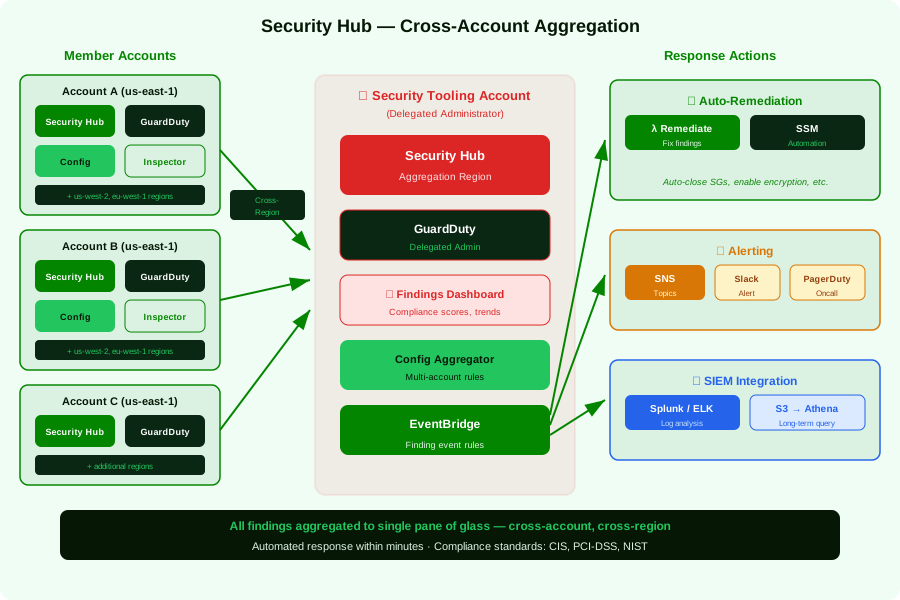
Security Hub: Your Single Pane of Glass
Security Hub aggregates findings from GuardDuty, Inspector, Config, Firewall Manager, IAM Access Analyzer, and third-party tools into a single dashboard with compliance scoring.
Setting Up Cross-Account Security Hub
Automated Remediation
Don't just detect — remediate automatically for well-understood violations:
# Lambda function for auto-remediation of public S3 buckets
import boto3

def handler(event, context):
    """Triggered by Security Hub finding via EventBridge"""

    finding = event['detail']['findings'][0]

    # Only auto-remediate specific finding types
    if finding['Type'] != 'Software and Configuration Checks/AWS Security Best Practices':
        return

    generator_id = finding['GeneratorId']

    if 'S3.2' in generator_id:  # S3 bucket with public read
        bucket_name = finding['Resources'][0]['Id'].split(':')[-1]

        s3 = boto3.client('s3')

        # Block public access
        s3.put_public_access_block(
            Bucket=bucket_name,
            PublicAccessBlockConfiguration={
                'BlockPublicAcls': True,
                'IgnorePublicAcls': True,
                'BlockPublicPolicy': True,
                'RestrictPublicBuckets': True
            }
        )

        # Update finding status
        securityhub = boto3.client('securityhub')
        securityhub.batch_update_findings(
            FindingIdentifiers=[{
                'Id': finding['Id'],
                'ProductArn': finding['ProductArn']
            }],
            Note={
                'Text': 'Auto-remediated: Public access blocked',
                'UpdatedBy': 'auto-remediation-lambda'
            },
            Workflow={'Status': 'RESOLVED'}
        )

        print(f"Remediated public access on bucket: {bucket_name}")
Standards I Enable by Default
- AWS Foundational Security Best Practices (FSBP) — Comprehensive, well-maintained
- CIS AWS Foundations Benchmark — Industry standard for compliance
- PCI DSS (if applicable) — For payment card data environments
💡 Pro Tip: Don't enable every Security Hub standard on day one. Start with FSBP, fix all critical/high findings, then add CIS. Enabling everything at once creates alert fatigue — I've seen teams with 15,000+ findings who just stop looking at the dashboard entirely.
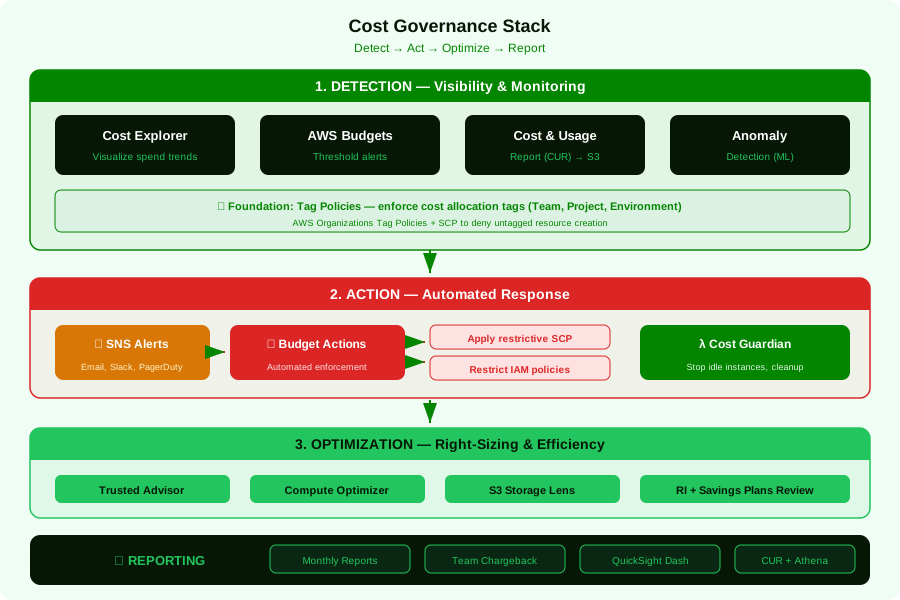
Cost Governance: The CFO's Best Friend
The Cost Governance Stack
Budget Strategy
I set up budgets at multiple levels:
Organization Level:
  └── Total monthly budget: $500,000 (alert at 80%, 90%, 100%)

OU Level:
  ├── Production OU: $350,000 (alert at 85%, 95%)
  ├── Development OU: $100,000 (alert at 90%)
  └── Sandbox OU: $10,000 (alert at 80%, auto-action at 100%)

Account Level:
  ├── team-alpha-prod: $50,000 (alert at 85%)
  └── sandbox-dev-jane: $200 (auto-deny at $200)
For sandbox accounts, I use Budget Actions to automatically apply an SCP that denies ec2:RunInstances, rds:CreateDBInstance, and other resource-creation actions when the budget threshold is hit.
Tagging Strategy: The Glue That Holds It Together
Tags are the foundation of cost attribution, automation, and compliance. Here's my mandatory tag schema:
Required Tags (enforced via SCP + Config Rules):
  - Environment: [production, staging, development, sandbox]
  - Team: [alpha, beta, platform, data, security]
  - CostCenter: CC-XXXX
  - Application: [app-name]
  - Owner: [email address]
  - DataClassification: [public, internal, confidential, restricted]

Optional but Recommended:
  - Terraform: [true/false]
  - Pipeline: [pipeline-name]
  - ExpirationDate: [YYYY-MM-DD] # For temporary resources
Enforcing tags with an SCP:
{
  "Version": "2012-10-17",
  "Statement": [
    {
      "Sid": "EnforceTagging",
      "Effect": "Deny",
      "Action": [
        "ec2:RunInstances",
        "rds:CreateDBInstance",
        "rds:CreateDBCluster",
        "lambda:CreateFunction",
        "ecs:CreateService",
        "s3:CreateBucket"
      ],
      "Resource": "*",
      "Condition": {
        "Null": {
          "aws:RequestTag/Environment": "true",
          "aws:RequestTag/Team": "true",
          "aws:RequestTag/CostCenter": "true"
        }
      }
    }
  ]
}
Pair this with an AWS Config rule that detects resources missing tags after creation (for resources that don't support tag-on-create):
# Config Rule: required-tags
ConfigRuleName: required-tags
Source:
  Owner: AWS
  SourceIdentifier: REQUIRED_TAGS
InputParameters:
  tag1Key: Environment
  tag2Key: Team
  tag3Key: CostCenter
  tag4Key: Owner
Scope:
  ComplianceResourceTypes:
    - AWS::EC2::Instance
    - AWS::RDS::DBInstance
    - AWS::Lambda::Function
    - AWS::S3::Bucket
    - AWS::ECS::Service
💡 Pro Tip: Tag enforcement is one of the highest-ROI governance investments you can make. Without consistent tags, your cost reports are useless, your automation breaks, and your compliance team is flying blind. Fight this battle early. It only gets harder as your environment grows.
CloudTrail: Your Audit Trail
Organization-Level CloudTrail
Deploy a single organization trail that covers all accounts:
resource "aws_cloudtrail" "organization" {
  name                          = "organization-trail"
  s3_bucket_name                = aws_s3_bucket.cloudtrail.id
  include_global_service_events = true
  is_multi_region_trail         = true
  is_organization_trail         = true
  enable_log_file_validation    = true

  cloud_watch_logs_group_arn    = "${aws_cloudwatch_log_group.cloudtrail.arn}:*"
  cloud_watch_logs_role_arn     = aws_iam_role.cloudtrail_cloudwatch.arn

  event_selector {
    read_write_type           = "All"
    include_management_events = true

    data_resource {
      type   = "AWS::S3::Object"
      values = ["arn:aws:s3"]
    }

    data_resource {
      type   = "AWS::Lambda::Function"
      values = ["arn:aws:lambda"]
    }
  }

  insight_selectors {
    insight_type = "ApiCallRateInsight"
  }

  insight_selectors {
    insight_type = "ApiErrorRateInsight"
  }
}
Key CloudTrail best practices:
- Send logs to a dedicated Log Archive account — No one can tamper with the audit trail
- Enable log file validation — Detect if logs have been modified
- Enable CloudTrail Insights — Detects unusual API activity (anomaly detection)
- Protect with an SCP — Prevent accounts from deleting/modifying the organization trail
- Set up Athena for querying — CloudTrail Lake is powerful but expensive at scale; Athena on S3 is more cost-effective for most organizations
Compliance Automation: Config Rules + Conformance Packs
AWS Config continuously monitors resource configurations and evaluates them against rules. At scale, use Conformance Packs — collections of Config Rules deployed as a single unit.
Organization-Wide Conformance Pack
# conformance-pack-security-baseline.yaml
Parameters:
  MaxAccessKeyAge:
    Type: String
    Default: '90'

Resources:
  IAMPasswordPolicy:
    Type: AWS::Config::ConfigRule
    Properties:
      ConfigRuleName: iam-password-policy
      Source:
        Owner: AWS
        SourceIdentifier: IAM_PASSWORD_POLICY
      InputParameters:
        RequireUppercaseCharacters: 'true'
        RequireLowercaseCharacters: 'true'
        RequireSymbols: 'true'
        RequireNumbers: 'true'
        MinimumPasswordLength: '14'
        PasswordReusePrevention: '24'
        MaxPasswordAge: '90'

  AccessKeyRotation:
    Type: AWS::Config::ConfigRule
    Properties:
      ConfigRuleName: access-key-rotated
      Source:
        Owner: AWS
        SourceIdentifier: ACCESS_KEYS_ROTATED
      InputParameters:
        maxAccessKeyAge: !Ref MaxAccessKeyAge

  S3BucketPublicReadProhibited:
    Type: AWS::Config::ConfigRule
    Properties:
      ConfigRuleName: s3-bucket-public-read-prohibited
      Source:
        Owner: AWS
        SourceIdentifier: S3_BUCKET_PUBLIC_READ_PROHIBITED

  EncryptedVolumes:
    Type: AWS::Config::ConfigRule
    Properties:
      ConfigRuleName: encrypted-volumes
      Source:
        Owner: AWS
        SourceIdentifier: ENCRYPTED_VOLUMES

  RDSEncryptionEnabled:
    Type: AWS::Config::ConfigRule
    Properties:
      ConfigRuleName: rds-storage-encrypted
      Source:
        Owner: AWS
        SourceIdentifier: RDS_STORAGE_ENCRYPTED

  RootAccountMFAEnabled:
    Type: AWS::Config::ConfigRule
    Properties:
      ConfigRuleName: root-account-mfa-enabled
      Source:
        Owner: AWS
        SourceIdentifier: ROOT_ACCOUNT_MFA_ENABLED

  VPCFlowLogsEnabled:
    Type: AWS::Config::ConfigRule
    Properties:
      ConfigRuleName: vpc-flow-logs-enabled
      Source:
        Owner: AWS
        SourceIdentifier: VPC_FLOW_LOGS_ENABLED
Deploy it across the organization:
aws configservice put-organization-conformance-pack \
  --organization-conformance-pack-name security-baseline \
  --template-s3-uri s3://config-templates/conformance-pack-security-baseline.yaml \
  --excluded-accounts '["123456789012"]'  # Exclude management account
The Governance Maturity Model
I use this framework to help organizations assess where they are and where they need to go:
| Level | Description | Key Capabilities |
|---|---|---|
| 1 — Reactive | Single account, no guardrails | Manual security reviews, no cost visibility |
| 2 — Foundational | Multi-account, basic SCPs | Organization trail, basic budgets, IAM Identity Center |
| 3 — Managed | OU structure, Config Rules | Automated compliance checks, tag enforcement, Security Hub |
| 4 — Optimized | Full automation, self-service | Auto-remediation, account vending, IaC-only deployments |
| 5 — Continuous | Policy-as-code, continuous compliance | OPA/Cedar policies, drift detection, compliance dashboards |
Most organizations I work with are between Level 2 and Level 3. Getting to Level 4 requires significant investment in automation but pays for itself within 6 months through reduced operational overhead and faster team velocity.
Putting It All Together: A 30-Day Governance Sprint
If I'm setting up governance for a new organization, here's my timeline:
Week 1: Foundation
- Set up AWS Organizations with the OU structure above
- Configure IAM Identity Center with your IdP
- Deploy the organization CloudTrail to a Log Archive account
- Apply baseline SCPs (prevent leaving org, region restrictions, protect security infra)
Week 2: Security
- Enable Security Hub with FSBP standard across all accounts
- Enable GuardDuty across all accounts (delegated admin)
- Deploy organization Config Rules (conformance pack)
- Set up cross-account Security Hub aggregation
Week 3: Cost
- Implement tagging strategy with SCP enforcement
- Set up AWS Budgets at org, OU, and account levels
- Enable Cost Anomaly Detection
- Configure CUR delivery to S3 for detailed analysis
Week 4: Automation
- Build account vending pipeline (Control Tower AFT or custom)
- Set up auto-remediation for critical findings
- Create compliance dashboards (QuickSight or Grafana)
- Document runbooks and train the team
💡 Pro Tip: Don't try to boil the ocean. Start with the highest-impact, lowest-effort guardrails (organization trail, region restrictions, Security Hub). Then iterate. Perfect governance that ships in 6 months is worse than good-enough governance that ships in 30 days.
Key Takeaways
-
Multi-account is mandatory, not optional. Account boundaries are your strongest security and isolation primitive. Use them aggressively.
-
SCPs are your most powerful tool. They define the ceiling of what's possible in an account. Use deny-list approach for most organizations, with essential SCPs for region restriction, security protection, and cost control.
-
Automate account provisioning. Whether through Control Tower AFT or custom pipelines, account creation should be self-service and standardized. No tickets, no delays.
-
Tags are governance infrastructure. Enforce them from day one. Without consistent tags, cost attribution, automation, and compliance are impossible.
-
Detect and remediate, don't just alert. Security Hub findings that sit in a dashboard for weeks aren't useful. Auto-remediate the well-understood ones (public S3 buckets, unencrypted volumes), alert on the rest.
-
Governance enables speed. The goal isn't to slow teams down — it's to give them a safe, well-lit highway to drive fast on. Guardrails, not gates.
-
Start with the 30-day sprint. Don't wait for perfect. Get the foundation in place, then iterate continuously.
What's Next
This completes my three-part series on AWS architecture fundamentals. If you found these articles useful, I'd recommend diving deeper into:
- AWS Compute — Choosing the Right Engine for the Job — Navigate the compute landscape with confidence
- Serverless on AWS — Beyond the Hype — Event-driven patterns, cost realities, and honest opinions on serverless
- Infrastructure as Code at Scale — How to manage hundreds of accounts with Terraform, CDK, or CloudFormation (coming soon)
- AWS Networking for the Real World — Transit Gateway, PrivateLink, VPC design patterns, and hybrid connectivity (coming soon)
Building on AWS at scale is equal parts technical skill and organizational design. The best architectures I've seen aren't just technically sound — they're backed by governance frameworks that let teams move fast without breaking things. That's the sweet spot we should all be aiming for.